The VIP List Management Tool for Venues, Artists and Events
Keep every VIP list in one place, decide who can add names, and get a text or email the moment a VIP walks through the door.
No credit card required

VIP Lists, Alerts and Check-In. One Simple Tool.
From the first name on the list to the moment your VIP is through the door, everything lives in one place your whole team can see.
Private VIP Lists
Keep VIP, comp and industry lists private, so guests cannot sign themselves up and only the users you assign can add names.
VIP Arrival Alerts
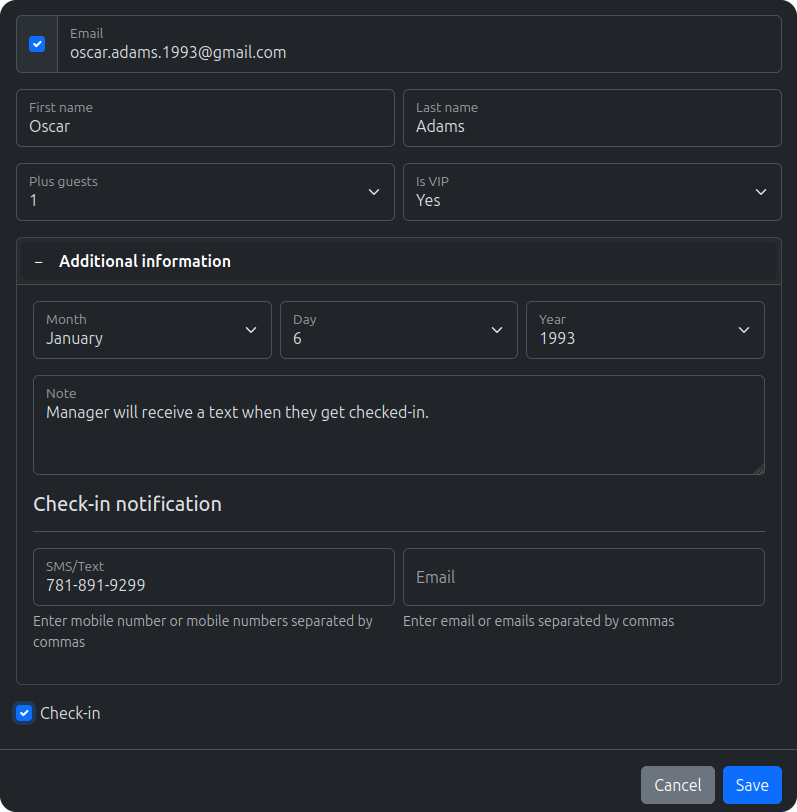
Get a text or email the moment a VIP checks in, and send the alert to the manager, host or artist who needs to greet them.
Plus-One Allowances
Set how many plus guests each VIP can bring, so your door team knows the size of every party before it reaches the front.
Guest Details at the Door
Collect the details that matter, like table, company or notes, and show them to your door team the moment they find the guest.
QR Codes and Wallet Passes
VIPs get a QR code by email and can add it to Apple Wallet or Google Wallet for a fast, personal check-in.
Permanent VIP Lists
Add your regulars and VIPs to a permanent guest list once, and carry them over to every event.
Know the Moment a VIP Walks In
Turn on a check-in notification for any guest and GuestQueue sends a text or email as soon as they arrive, so someone is ready to meet them instead of finding out later.
- Text or email alerts on check-in
- Notify more than one person
- Get notified when VIPs sign up
- Know when they check out, too
Email notifications are included. Text messages require SMS credits.

Every Artist Gets Their Own VIP List
Give each artist, DJ or band their own login and VIP list for the show. They add their guests and plus-ones from their phone, and the list closes before doors so your box office is never chasing names.
- Artists log in from any device
- Set a guest limit for each list
- Close the list at a set time before doors
- Artists see which of their guests checked in
Give VIPs the Arrival They Expect
A VIP should never be left waiting while someone scrolls through a group chat. Your door team sees every VIP list on one screen, on any device.
A Separate VIP Entrance
Check guests in at the VIP door and the main door at the same time. Every device updates instantly, so nobody gets in twice.
VIP and General Lists, Side by Side
Run your VIP lists alongside general admission and see which list every guest came from as you check them in.
Find Any VIP in Seconds
Scan their QR code or type a few letters of their name. No clipboards and no spelling names over the music.
See Who Is Still Inside
Turn on check-out and separate counters show how many guests have checked in, checked out and remain inside.
Know Which VIPs Showed Up
See who checked in and when, then export the night so follow-ups and settlements are based on real numbers.
VIPs Added Automatically
Send VIPs from your CRM, reservation system or website straight to the list through Zapier or the Guest API.
VIP List Management Questions
Have Your VIP List Ready Before Doors Open
Set up your first VIP list in minutes, invite your artists and team, and know the moment your VIPs arrive. It’s free to get started.
No credit card required